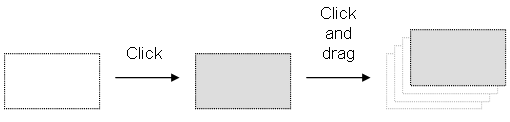
Dragging the selected items moves them to the specified location. If you press the CTRL key while dragging, then items are copied (for shortcuts, Using the FFLD Editor).
To move a function block, you must select it entirely.
If you move or copy items on a non-empty area, you will be prompted to confirm the overwriting of items in the area.
When you move or copy items only on a network header, the network is automatically moved in order to make the required extra space for moved items.
The "Copy / Cut / Paste" commands can also be used as an alternative to drag-and-drop.
A rectangular selection within the diagram cannot cross a network header, i.e. all selected items must be within the same network. To select a complete network or more, you must select complete rows. To do this, move the caretThe term caret is also sometimes used in graphical user interface terminology where it means a text insertion point indicator, frequently represented by a blinking vertical bar. In this context, it may be used interchangeably with the word cursor, although the latter term is often reserved for a mouse pointer to the left border or click on the left-hand side ruler (gray).
|
Stay Connected with Kollmorgen       
|
Copyright © 2015 Kollmorgen™ |

|